



Description
Download Advanced Renamer – Bulk File Renaming, Media Organizer, File Utility
Overview
Advanced Renamer is a free utility designed to simplify the process of renaming large batches of files and folders with precision and speed. The app addresses a common challenge faced by users managing digital content: the tedious and error-prone task of manually renaming multiple files. Whether organizing photos, music, documents, or project folders, Advanced Renamer streamlines the workflow by offering automated, rule-based renaming. It is especially valuable for users who work with multimedia files, as it supports metadata extraction from formats like MP3 (ID3 tags) and image files (EXIF data), enabling intelligent renaming based on embedded information such as artist, album, date, or location.
The target audience includes digital content creators, photographers, musicians, archivists, and anyone managing large file collections. The app's intuitive interface and real-time preview feature help users maintain control and accuracy during batch operations. Although the developer did not provide additional technical details, the application is structured to serve as a reliable tool within the productivity and file management ecosystem. Its ability to reduce manual effort and minimize errors positions it as a practical solution for efficient digital organization.
Key Features & Functionality
- Bulk Renaming Options: Advanced Renamer provides eight distinct renaming methods, allowing users to rename files based on attributes like file size, creation date, extension, or custom text. This flexibility enables users to apply consistent naming conventions across entire directories.
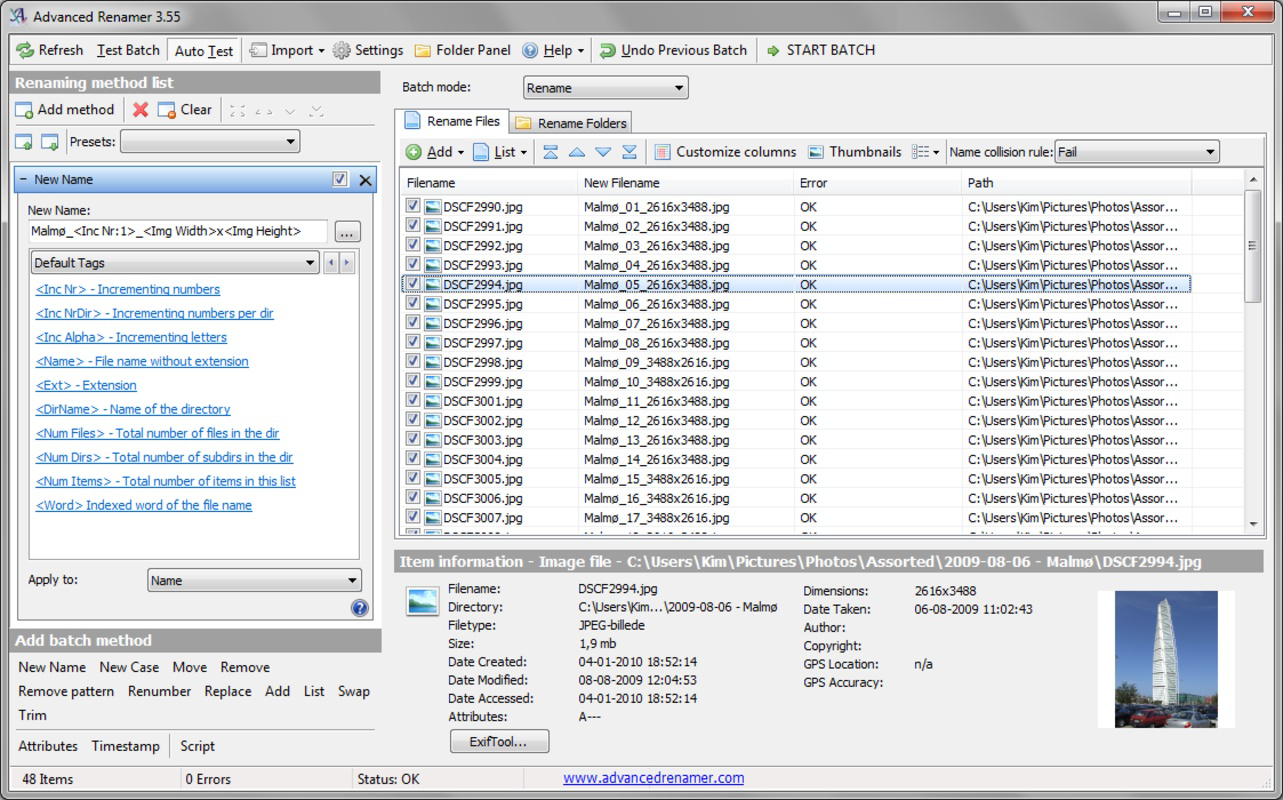
- Real-Time Preview: Before executing any changes, users can view the outcome of their renaming rules instantly. This visual feedback helps prevent mistakes and ensures that the final file names meet expectations.
- Customizable Case Sensitivity: The app supports various case formatting options, including uppercase, lowercase, title case, and sentence case. This feature is ideal for aligning file names with specific naming standards or platform requirements.
- Undo Functionality: In case of unintended changes, the built-in undo function allows users to revert the last operation. This safety net enhances user confidence during batch processing.
- Media Metadata Support: Advanced Renamer leverages ID3 tags from audio files and EXIF data from images to extract and incorporate metadata into file names. This is particularly useful for organizing music libraries or photo collections by artist, date, or location.
For example, a photographer can rename hundreds of images using the EXIF date and time, automatically creating filenames like "IMG_20250810_143022.jpg". Similarly, a music enthusiast can rename a folder of MP3s using the artist and track title from ID3 tags, resulting in a clean, consistent library.
Interface, UX & Performance
The user interface of Advanced Renamer is designed with clarity and efficiency in mind. It presents a clean layout with clearly labeled sections for file selection, renaming rules, and preview output. Navigation is straightforward, allowing users to load files, apply rules, and review changes without unnecessary steps. The real-time preview feature enhances usability by displaying the resulting file names as users adjust settings, reducing the need for trial and error.
Although the developer did not list formal performance metrics, the app is optimized for handling large file sets without significant lag. Users can expect responsive behavior on mid-range and high-end devices, with minimal impact on system resources during operation. Stability is maintained through the undo function and safe execution protocols, ensuring that file operations do not compromise data integrity. The interface remains consistent across different screen sizes, though specific compatibility details were not disclosed.
Platform Compatibility & Technical Requirements
Advanced Renamer is available for the Android platform. The current software version is not specified, nor are the minimum OS requirements or exact file size. The developer did not provide additional technical details. Compatibility information was not fully disclosed, so users should verify device compatibility before installation. The app is offered as a free download, with no in-app purchases or subscription fees mentioned.
Pros and Cons
Pros
- Free to download and use with no hidden costs.
- Supports batch renaming for large file sets with high efficiency.
- Real-time preview helps prevent errors during renaming.
- Strong metadata support for audio (ID3) and image (EXIF) files.
- Includes undo functionality for safe file modifications.
- Flexible renaming rules with customizable case options.
Cons
- Specific OS version requirements were not listed.
- File size and detailed system requirements were not disclosed.
- Compatibility with older devices or specific Android versions is unclear.
- No information on update frequency or developer support channels.
- Advanced features may have a learning curve for new users.
FAQ
Is Advanced Renamer safe to download and install?
Yes, the app is designed as a free utility and does not require excessive permissions. It operates locally on the device, ensuring user data remains private and secure during file operations.
Can I use Advanced Renamer to rename photos and music files?
Yes, the app supports metadata extraction from image and audio files, allowing users to rename files based on EXIF data (like date and location) or ID3 tags (like artist and album).
Does Advanced Renamer support batch renaming?
Yes, the app is specifically built for batch processing, enabling users to rename multiple files and folders simultaneously using customizable rules.
Is there an undo option if I make a mistake?
Yes, the app includes an undo function that allows users to revert the last renaming action, providing a safety net during file management tasks.
Can I use Advanced Renamer on iOS devices?
The app is currently available for Android. Platform availability for iOS was not confirmed in the provided information.
Final Thoughts
Advanced Renamer stands out as a powerful, no-cost tool for users seeking to organize large volumes of digital files efficiently. Its support for metadata-based renaming, real-time preview, and undo functionality make it a reliable choice for both casual users and professionals. While technical details such as OS requirements and file size are not publicly disclosed, the app’s core functionality is robust and well-suited for media and document management. For anyone dealing with disorganized file collections, this utility offers a practical, secure, and user-friendly solution.
Download Advanced Renamer now
Guides & Tutorials for Advanced Renamer
How to install Advanced Renamer
- Click the Preview / Download button above.
- Once redirected, accept the terms and click Install.
- Wait for the Advanced Renamer download to finish on your device.
How to use Advanced Renamer
This software is primarily used for its core features described above. Open the app after installation to explore its capabilities.
User Reviews for Advanced Renamer 0
No reviews found


